Every price change means reprinting
A new price, a new dish or a sold-out item: the paper menu is out of date at once, and replacing it costs time and money.
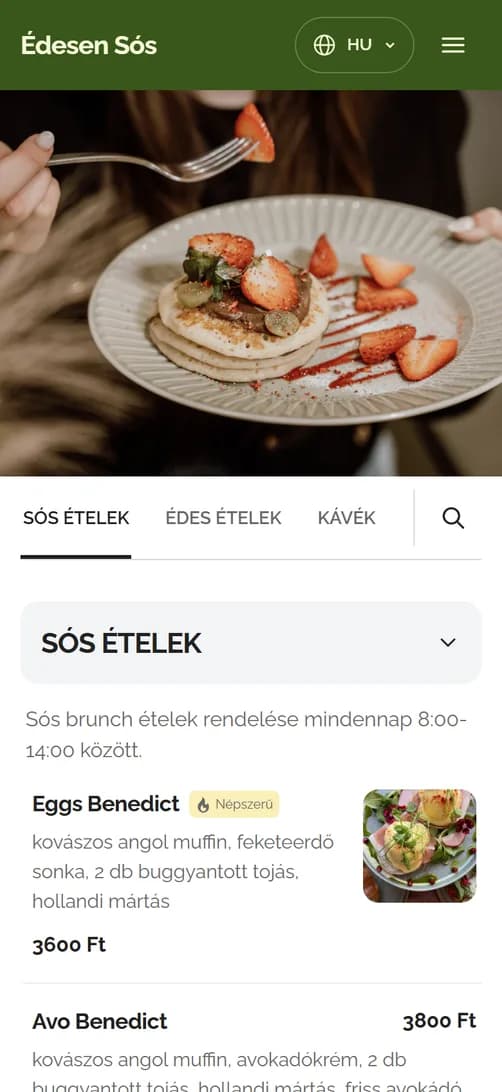
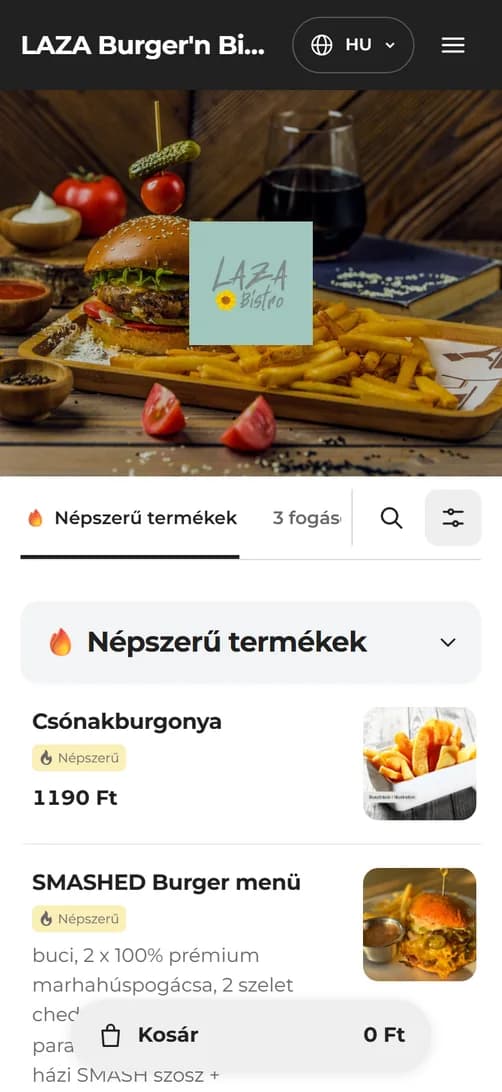
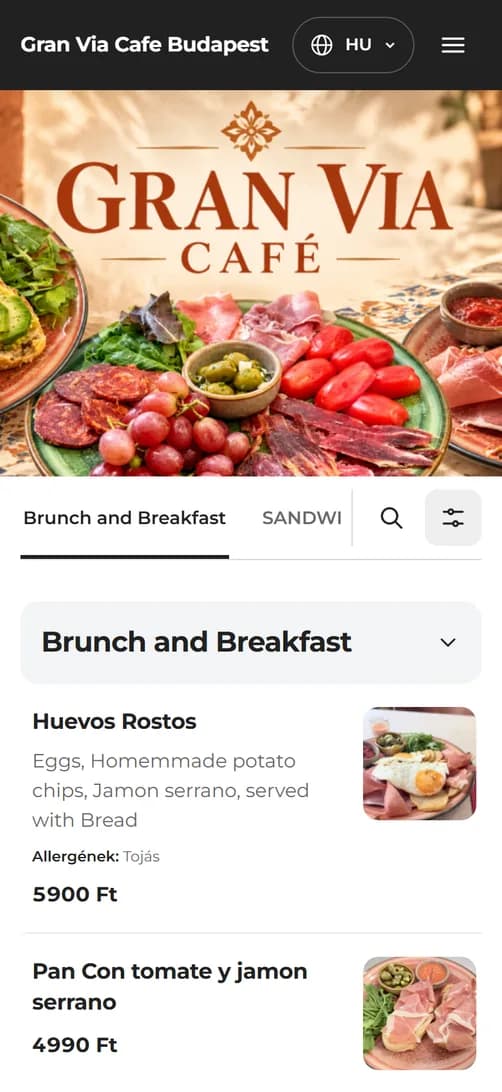
A paper menu goes out of date with every price change, guests wait for someone to take their order, and guests from abroad guess. A QR code menu shows the current menu on their phone, in their language, and lets them order from it if you allow.
A new price, a new dish or a sold-out item: the paper menu is out of date at once, and replacing it costs time and money.
At peak times guests wait while waiters run back and forth for menus and orders.
The foreign-language menu is often missing or out of date, and guests guess what to order.
The QR menu works from the menu you manage in ORSYS; there is no separate product list. When you change a price or hide a product, it appears on your guests' phones within minutes. You choose per product and per group what the QR menu shows.
In the ordering mode guests put together and submit their order to the table on their phone. The waiter accepts it in the POS, and the items go onto the table's bill. Without approval, the order is recorded at once.
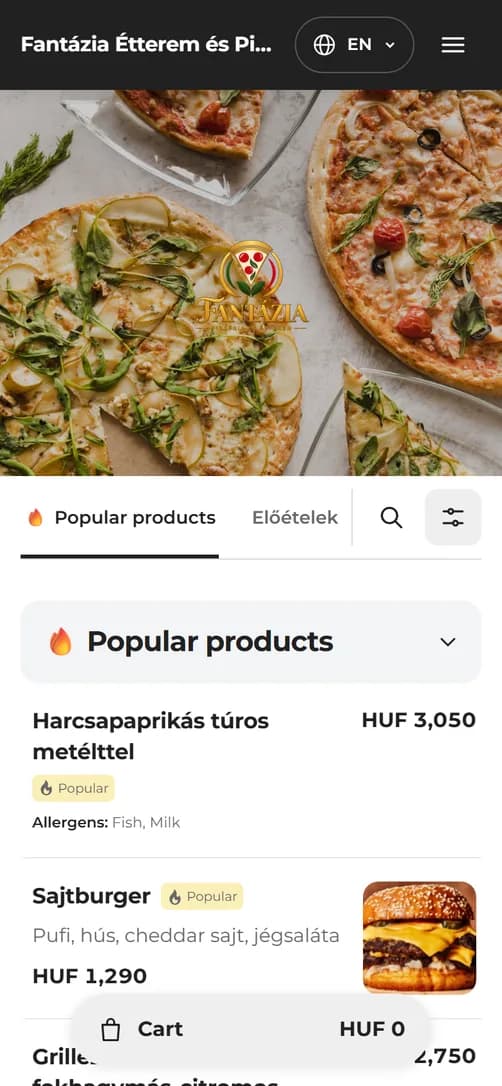
Popular products at the top of the menu, toppings with surcharges, and discount and recommended badges on the cards: guests see more and add more.
Guests read the menu on their phone and, in the ordering mode, order from it too. The waiter only accepts the order in the POS and has more time for service.
The interface is in Hungarian, English, German and Romanian, and you can translate your menu into any language. Guests from abroad know exactly what they order.
Your own logo, banner image, colours and font: guests see your restaurant's menu, not a shared app.
Five steps from scanning the QR code to an order on the table, on the QR menu's real interface.
The QR code on the table opens the menu on their phone, with no download or registration. Popular products appear right at the top, and they can search for anything.
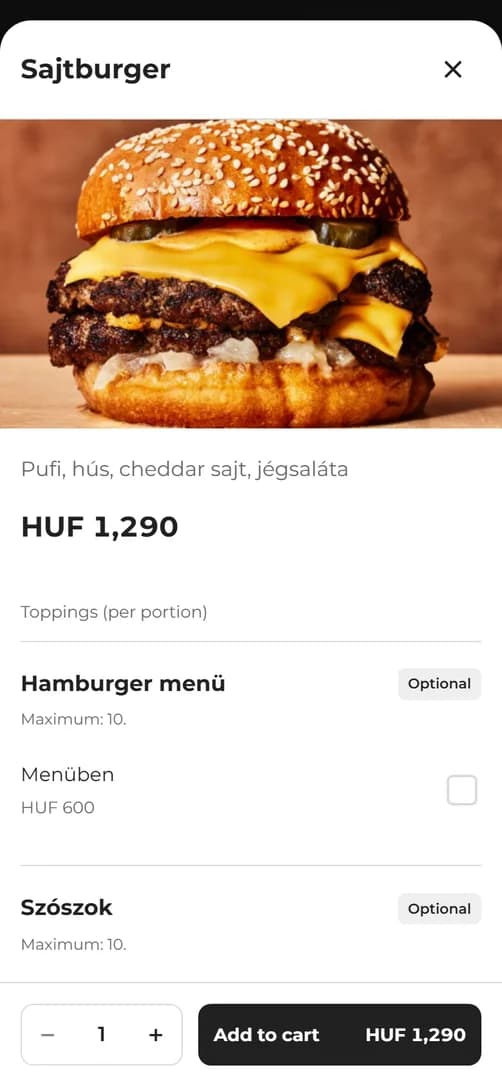
The product's picture, description, price, allergens and nutrition in one place. With the allergen filter they see only what they can eat.
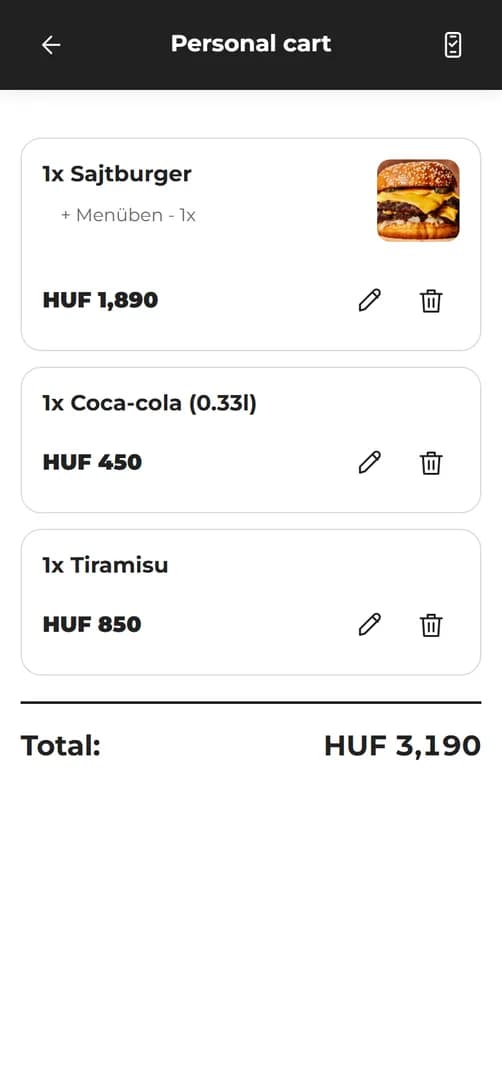
They choose toppings, a half portion or an exact quantity and see the total at once. The waiter view shows the selection to the waiter in the restaurant's language.
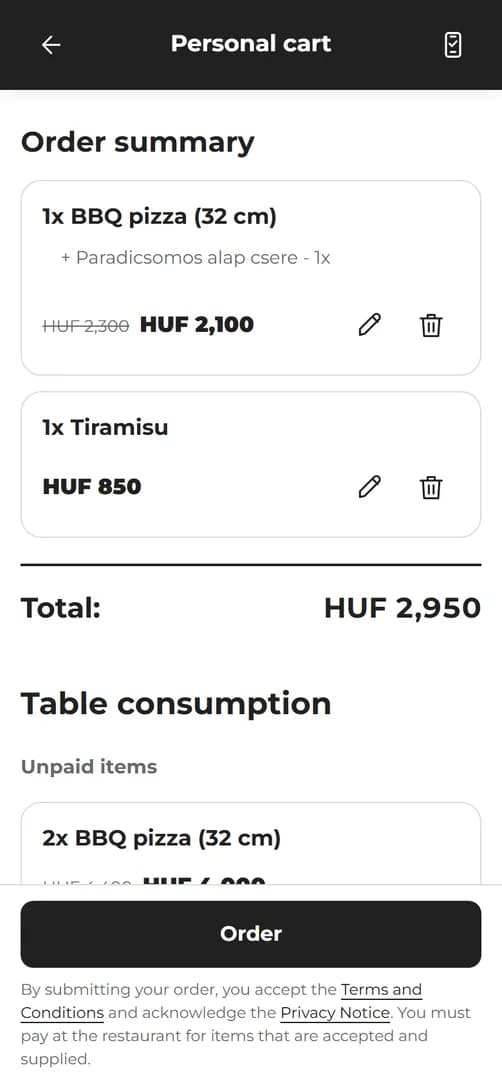
In the ordering mode one tap sends the order to the table. The waiter accepts it in the POS, and the items go onto the table's bill.
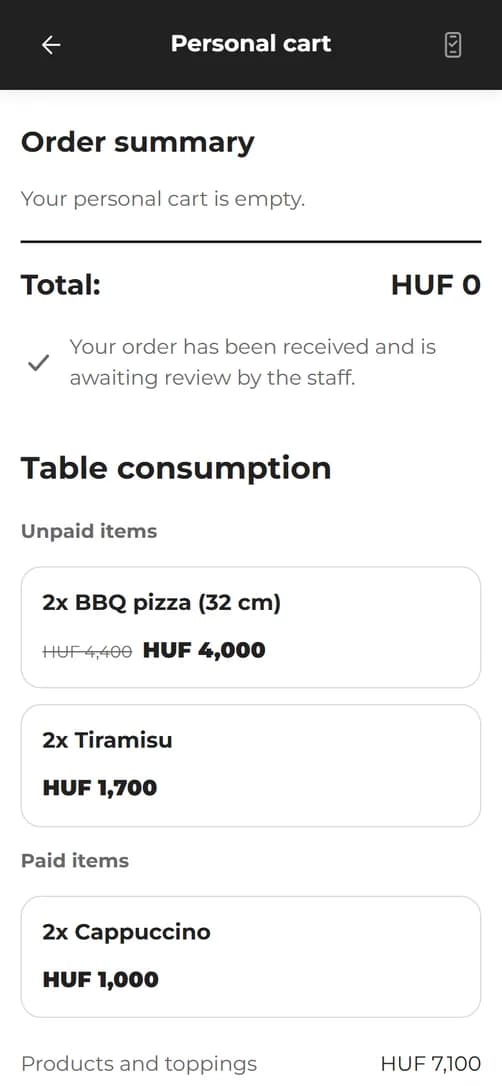
If you allow it, guests follow on their phone what is already on the table, what has been paid and what is due.
You can change the operating mode in the admin at any time. The menu and the personal basket come with the base fee; the ordering mode adds a tiered ordering surcharge on top of it.
Guests browse and search the menu and see the products' details, allergens and nutrition. Available already with the Mini package.
Guests build their basket on their phone and show it to the waiter in the waiter view, in the restaurant's language. No order is submitted. Available already with the Mini package.
Guests submit their order from the table; the waiter accepts it in the POS, or it is recorded at once. With a waiter call and a view of the table's bill. Available from the Basic package.
The interface is in Hungarian, English, German and Romanian, and you can translate your menu into any language in the admin. Guests read it in their own language.
The most ordered products in their own group at the top of the menu. New, discount, recommended and chef's choice badges on the product cards.
Guests can filter out the allergens they avoid and see the nutrition values per 100 grams in the product details.
Required and optional topping groups with minimums and maximums. The surcharge is added to the total at once.
A half portion in one tap; for products sold by weight guests enter an exact quantity, priced in proportion to the base quantity.
The basket comes together on the guest's phone. The waiter view shows the items and quantities in large type, in the restaurant's language.
In the ordering mode guests submit their basket to the table. The waiter accepts it in the POS, or the order is recorded at once, as you set it.
If you ask for it, guests enter their first name before ordering, so the waiter knows whose order was submitted.
Guests signal with one tap that they need a waiter at the table. The call arrives for the table and cannot be repeated within five minutes.
If you allow it, guests see the items already recorded, the paid and the due amount, including the service charge.
Every table gets its own QR code with the table's name in the middle. With an optional PIN, only guests seated there can order to the table.
Your own logo, banner image, two colours and a choice of ten fonts, with a restaurant name set separately for the QR menu.
An introduction, a phone number and an email address that guests can call or write to with one tap.
A price change appears on your guests' phones within minutes. There is no menu to reprint.
No separate product list: guests see the same menu you manage in the POS, with QR visibility switchable per product.
Labelled controls, an interface usable with a keyboard and a screen reader, and support for reduced motion.
The menu opens in the browser, on iPhone and Android alike. No installation, no registration.
The QR menu runs on ORSYS Restaurant Software, which we developed for the real needs of hospitality venues. It is not a generic menu builder: the menu, prices and tables are in one place, and updates are free.
The QR menu's monthly net base fee is HUF 4,990. It covers every feature of the menu and personal basket modes: the multilingual menu, the allergen filter, toppings, the waiter view and your own branding.
With the Premium package you do not pay the base fee separately. With the Mini and Basic packages it is paid on top of the ORSYS subscription. There is no setup fee and no hidden cost.
HUF 4,990
net base fee a month
Included in the Premium package, where it is not charged.
Only in the ordering mode, on top of the base fee. The number of QR orders accepted in a 30-day period sets the tier, so a smaller restaurant pays less. The Premium package does not include the surcharge either.
Orsys restaurant software is the best choice if you want a simple, easy-to-use restaurant system! Customer service is fast and precise. Whatever problem comes up, they find a solution as quickly as possible. This restaurant software really is here for us! 😊

Review 1 of 5
A fast, clear system. It is good to work with.
The software is great and super easy to use. The team is helpful and responds quickly to pretty much everything.
You are helpful, and the software is easy to use.
Getting started was a little bumpy, but we received all the help we needed to overcome the initial difficulties! I wholeheartedly recommend the ORSYS team!
Great software at a great price. Fast technical support. Convenience of the establishment of products and recipes. I recommend!
You entered the market in a way that puts bigger, longer-established companies to shame. You really belong here.














And 300+ more partners
If you would like to see what your restaurant's QR menu would look like, fill in the form. We will talk through which operating mode suits you and show it on your own menu. Applying places you under no obligation.
The QR menu's monthly net base fee is HUF 4,990, included in the Premium package; with the Mini and Basic packages it is paid on top of the ORSYS subscription.
In the ordering mode you pay a tiered ordering surcharge on top of the base fee, by the number of QR orders in a 30-day period: HUF 0 up to 10 orders, HUF 3,990 for 11–50 orders, HUF 8,990 for 51–100 orders, HUF 14,900 for 101–200 orders, HUF 29,900 for 201–400 orders and HUF 49,900 from 401 orders. There is no commission.
The QR menu is an add-on to ORSYS restaurant software, so it requires an ORSYS subscription. With the Mini package you can use the menu and personal basket modes; from the Basic package the ordering mode as well. The Premium package includes the base fee but not the ordering surcharge.
The ordering surcharge is paid in arrears for 30-day periods starting from activation, by the number of orders submitted from the QR menu and accepted in that period. Every accepted order counts once, even if the waiter later rejects it. If a guest resends the same order after a technical error, it counts as one order. Changing the operating mode does not start a new period.
No. Guests scan the QR code with their phone's camera, and the menu opens in the browser, on iPhone and Android alike. There is no installation and no registration.
The interface is in Hungarian, English, German and Romanian and follows the language of the guest's phone. You can translate your menu's product names and descriptions into any language in the admin; where there is no translation, guests see the text in the restaurant's default language.
No. The QR menu works from the menu you manage in ORSYS, with the same products, prices and toppings as the POS. You can switch per product and per product group what the QR menu shows, and turn topping choice on or off with one switch. Changes appear on your guests' phones within minutes.
In the ordering mode guests submit their basket to the table from their phone. The order arrives in the POS for that table, where the waiter accepts it, and the items go onto the table's bill. If you do not require the waiter's approval, the order is recorded on the table at once.
Every table has its own QR code, and you can optionally set a PIN that guests must enter before ordering. You can also ask for the guest's first name so the waiter knows whose order it is. You can set a minimum and maximum order value, and while a submitted order awaits approval, no further order can be submitted from that table.
No, the QR menu has no online payment. Guests pay in the restaurant as usual. If you allow it, they can see the table's bill on their phone: the recorded items, the amount already paid and the amount still due.
You generate and download the QR codes in the ORSYS admin. You can create a general restaurant code that only opens the menu, and a table code for every table with the table's name in the middle. You print the codes and place them on the tables.
The QR menu is built from your existing ORSYS menu, so you do not have to enter the products again. Once the appearance and the operating mode are set, the QR codes can be downloaded and used at once. After you apply, we contact you and show your own menu on a sample link.
If an always current menu, serving guests from abroad and giving your waiters more time for guests matter to you, request a demo. Together we will look at how the QR menu would work in your restaurant.